I'm not going to configure any Feature Proxies. I will use KMS activation but will give a example of MAK activation as well.
First step is to install the sequencer, if you have not yet.
Now go to the registry and add the value "VSL" the following multi-registry value:
HKEY_LOCAL_MACHINE\SOFTWARE\Microsoft\SoftGrid\4.5\Sequencer\SxSAppExtensions

If you are in a XP machine as well you will need to download Windows Search 4.0 and XPS Viewer and install them.
Disable Windows Update.
Now install the Office Deployment Kit. If you don't have it you can download it from here.

That's to install with the default KMS settings and with the PROPLUS license.
If you are using the STANDARD version replace PROPLUS=1 with STANDARD=1.
If you are using MAK then replace PROPLUS=1 with PIDKEYS=XXXXX-XXXXXX-XXXXX-XXXXX USEROPERATIONS=1
To use differente KMS settings: add KMSSERVICENAME="server.domain.com" KMSSERVICEPORT=1689 (that's the default port)
Make sure there are no warnings in the sequencer.

Select the source.

Name the package.

In the setup screen, click Customize.

Customize it as you wish but in the file location don't forget to change the destination to the virtual_drive_letter:\PackageName Eg: Q:\MSOffice2010ProPlus_x86

When it's done, select I am finished installing.

Now select the applications you want to customize and get rid of initial screens and click Run Selected.

Make sure you select Don't make changes.All updates should be done through patching the virtual package.

You can safely ignore the next screen.

Now select Customize. Further configure the virtual application package.

Now remove what you don't want user to see and do any customizations required.

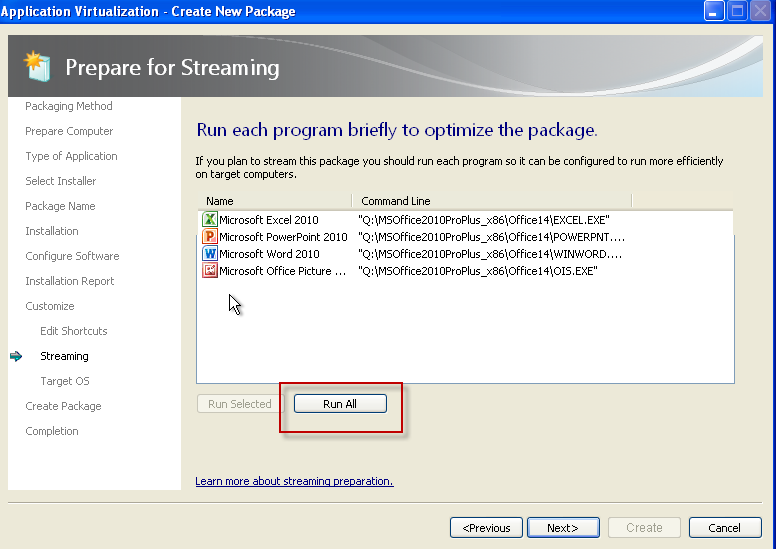
Now click to Run All.
Select which OS to restrict it to.

Now select to Continue to modify the package without saving using the package editor.

Ignore the next screen if it's the same as this.

Now in the Virtual Registry tab browse to
MACHINE\Software\Classes\CLSID\{9203C2CB-1DC1-482D-967E-597AFF270F0D}
Make a new Key and rename it to TreatAs, then select to Override local key.
Do the same to
MACHINE\Software\Classes\CLSID\{BDEADEF5-C265-11D0-BCED-00A0C90AB50F}

Now go to MACHINE\Software\Microsoft\Office\14.0 and set it to Merge with Local Key. In my case this was already selected.
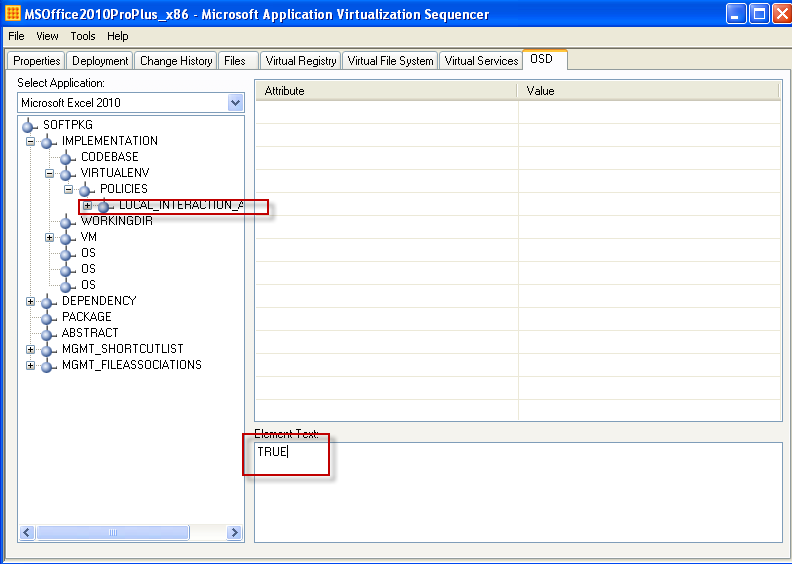
Now go to the OSD tab, browse to IMPLEMENTATION > VIRTUALENV and click on LOCAL_INTERACTION_ALLOWED and set it to TRUE. Do the same for all OSDs.
Save the package and you are done!

No comments:
Post a Comment